Jul 17, 2026
Building The Thinking Stack
How Markdown, GitHub Actions, S3, CloudFront, ACM, and Cloudflare fit together to publish this site.
I wanted a small blogging site where publishing blogs began with a Markdown file and ended with a fast, secure page on my own domain. I did not want a database, an admin panel, or a server that had to run continuously. The site only needed to turn text into HTML and deliver it reliably.
That simple requirement led to this architecture:
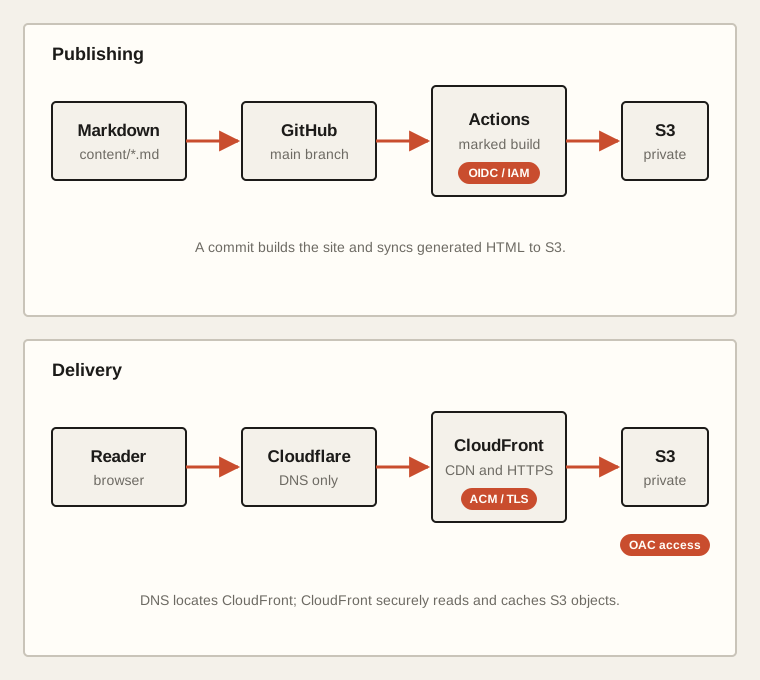
The finished system is small, but it crosses several boundaries: DNS decides where a request goes, TLS proves the identity of the site, CloudFront serves and caches content, S3 stores it, and GitHub Actions deploys it. This is how those pieces fit together, including a few details I did not fully understand when I started.
Starting at the source:
Every entry begins as a file in content/ with a small block of metadata:
---
title: Building The Thinking Stack
date: 2026-07-17
description: How the infrastructure behind this site fits together.
tags: aws, infrastructure, building
---

The article starts here...
The filename becomes the URL slug. For example, building-the-thinking-stack.md is published at /posts/building-the-thinking-stack/.
At build time, a Node script reads the file, validates the required fields, and passes the rest of the document to marked. Marked converts Markdown into HTML. The same script wraps that HTML in the site's layout and generates two kinds of pages:
dist/index.html
dist/posts/<POST_SLUG>/index.html
S3 and CloudFront never see Markdown. They receive the generated HTML, CSS, and JavaScript from dist/. Git remains the source of truth, while S3 is only the current deployable output.
Deploying without permanent AWS keys
A push to the main branch starts a GitHub Actions workflow. It checks out the repository, installs dependencies with npm ci, builds the site, synchronizes dist/ to S3, and invalidates CloudFront's cache.
The workflow needs AWS permissions, but I did not store an AWS access key in GitHub. Instead, GitHub Actions authenticates through OpenID Connect, or OIDC.
The sequence looks like this:
1. GitHub creates a signed OIDC token for the workflow.
2. The workflow presents that token to AWS Security Token Service.
3. AWS checks the token against the IAM role's trust policy.
4. AWS returns temporary credentials for that workflow run.
5. The credentials expire automatically.
The trust policy looks something like this:
{
  "Version": "2012-10-17",
  "Statement": [
    {
      "Effect": "Allow",
      "Principal": {
        "Federated": "arn:aws:iam::<AWS_ACCOUNT_ID>:oidc-provider/token.actions.githubusercontent.com"
      },
      "Action": "sts:AssumeRoleWithWebIdentity",
      "Condition": {
        "StringEquals": {
          "token.actions.githubusercontent.com:aud": "sts.amazonaws.com",
          "token.actions.githubusercontent.com:sub": "<GITHUB_REPOSITORY_MAIN_BRANCH_SUBJECT>"
        }
      }
    }
  ]
}
The aud condition says that the token must have been issued for AWS STS. The sub condition narrows access to the intended GitHub repository and its main branch. A workflow from another repository or branch should not be able to assume this role.
Trust answers who may assume the role. A separate permissions policy answers what the role may do after it has been assumed:
{
  "Version": "2012-10-17",
  "Statement": [
    {
      "Sid": "ListDeploymentBucket",
      "Effect": "Allow",
      "Action": ["s3:ListBucket", "s3:GetBucketLocation"],
      "Resource": "arn:aws:s3:::<S3_BUCKET_NAME>"
    },
    {
      "Sid": "ManageDeploymentObjects",
      "Effect": "Allow",
      "Action": ["s3:PutObject", "s3:GetObject", "s3:DeleteObject"],
      "Resource": "arn:aws:s3:::<S3_BUCKET_NAME>/*"
    },
    {
      "Sid": "InvalidateCloudFrontCache",
      "Effect": "Allow",
      "Action": "cloudfront:CreateInvalidation",
      "Resource": "arn:aws:cloudfront::<AWS_ACCOUNT_ID>:distribution/<CLOUDFRONT_DISTRIBUTION_ID>"
    }
  ]
}
This role can manage objects in one bucket and invalidate one distribution.
The deployment itself is roughly:
- run: npm ci
- run: npm run build
- run: aws s3 sync dist "s3://<S3_BUCKET_NAME>" --delete
- run: |
    aws cloudfront create-invalidation \
      --distribution-id "<CLOUDFRONT_DISTRIBUTION_ID>" \
      --paths "/*"
aws s3 sync uploads new or changed build files. The --delete option removes objects that no longer exist in dist/, which prevents deleted articles and old assets from accumulating in the bucket. The invalidation tells CloudFront not to keep serving an older cached copy after deployment.
S3 versioning is currently disabled. That keeps the setup simple, and Git can reproduce an older build, but it also means S3 itself cannot recover an overwritten or deleted object version.
Keeping the S3 bucket private
The S3 bucket has Block Public Access enabled. A reader cannot fetch its objects directly. CloudFront uses an S3 REST origin and Origin Access Control, or OAC, to read them.
The masked bucket policy is:
{
  "Version": "2012-10-17",
  "Statement": [
    {
      "Sid": "AllowCloudFrontServicePrincipal",
      "Effect": "Allow",
      "Principal": {
        "Service": "cloudfront.amazonaws.com"
      },
      "Action": "s3:GetObject",
      "Resource": "arn:aws:s3:::<S3_BUCKET_NAME>/*",
      "Condition": {
        "ArnLike": {
          "AWS:SourceArn": "arn:aws:cloudfront::<AWS_ACCOUNT_ID>:distribution/<CLOUDFRONT_DISTRIBUTION_ID>"
        }
      }
    }
  ]
}
The principal allows the CloudFront service to read objects, while AWS:SourceArn restricts that permission to one distribution. This is separate from the GitHub deployment role: CloudFront receives read-only delivery access, while GitHub receives object-management access.
REST endpoint or website endpoint?
S3 exposes two endpoint styles that look similar but behave differently.
An S3 REST endpoint looks like:
<S3_BUCKET_NAME>.s3.<AWS_REGION>.amazonaws.com
An S3 website endpoint looks like:
<S3_BUCKET_NAME>.s3-website-<AWS_REGION>.amazonaws.com
The website endpoint understands index and error documents, but it requires a public website-style configuration and does not support CloudFront OAC. The REST endpoint works with a private bucket and OAC, but it serves exact object keys rather than behaving like a web server.
That difference caused an interesting routing bug. CloudFront's default root object maps / to /index.html, but it does not recursively map /posts/hello-world/ to /posts/hello-world/index.html. With the REST origin, S3 looked for the exact key posts/hello-world/ and returned 403 Access Denied.
The deployment keeps the conventional posts/<POST_SLUG>/index.html file and also publishes the same document using the exact trailing-slash S3 key:
posts/<POST_SLUG>/
That preserves clean post URLs without making the bucket public or adding an edge rewrite.
CloudFront as the public edge
CloudFront is the only public path to the content. Its origin is the private S3 REST endpoint, and its default behavior applies to every path with Default (*).
The important settings are:
Viewer protocol policy: Redirect HTTP to HTTPS
Cache policy:           Managed-CachingOptimized
Default root object:    index.html
Alternate domain:       thethinkingstack.fyi
TLS security policy:    TLSv1.2_2021
Origin type:            S3 REST endpoint
Origin access:          Origin Access Control
When a reader uses HTTP, CloudFront redirects the request to HTTPS. The managed caching policy lets CloudFront reuse objects at edge locations instead of retrieving every request from S3. The alternate domain name tells CloudFront that it is allowed to serve requests whose host is thethinkingstack.fyi rather than only its generated *.cloudfront.net hostname.
CloudFront is configured to use all edge locations. A reader is normally served by a nearby edge, and the edge contacts S3 only when it does not already have a usable cached response.
TLS with AWS Certificate Manager
DNS can direct a browser to CloudFront, but HTTPS also requires CloudFront to prove that it is authorized to serve the domain. I requested an AWS-managed certificate from AWS Certificate Manager for:
thethinkingstack.fyi
*.thethinkingstack.fyi
The certificate was created in us-east-1. This region is important: certificates attached to CloudFront must be available in US East (N. Virginia), even when the S3 bucket or the people visiting the site are elsewhere.
The apex name covers thethinkingstack.fyi. The wildcard covers one-level subdomains such as www.thethinkingstack.fyi, but a certificate alone does not create DNS routing. www still needs a DNS record and must be added as a CloudFront alternate domain name before it can serve the site.
What the ACM validation CNAME proves
Before issuing the certificate, ACM needed proof that I controlled the requested names. It supplied a CNAME record resembling:
Name:   <ACM_VALIDATION_NAME>
Type:   CNAME
Target: <ACM_VALIDATION_TARGET>
A CNAME says, in effect, "this name is an alias of that name." Here it is not routing reader traffic. The random-looking name is a validation challenge, and its target belongs to AWS. When ACM finds that record in public DNS, it knows that someone with control over the domain's DNS accepted the certificate request.
The validation record should remain in DNS. ACM can use it when renewing the certificate automatically.
Cloudflare and DNS
I bought the domain from Cloudflare. The two relevant Cloudflare records have different jobs:
ACM validation CNAME  -> proves control of the domain to AWS
Website CNAME         -> points the domain toward CloudFront
Both records are configured as DNS only. Cloudflare answers DNS queries but does not proxy the HTTP connection. After resolving the name, the reader connects directly to CloudFront. Cloudflare is therefore not performing CDN caching, TLS termination, WAF filtering, or HTTP analytics for this site.
Well, that's about it. This is a brainchild of a simple thinking that, I write something and when I commit, it should be published on the site.
Until next time!